
Additional notes on how to use WP Rocket with Pressable (with examples)
Last updated 8/20/24
Video Guide: https://drive.google.com/file/d/1ItzmMkxLcJvD4NAAcH9Ix47W25X2DFUF/view?usp=drive_link
1. Make sure WP Rocket is updated to newest version.
2. Run a GTmetrix on the live website without touching anything.
3. Disable CDN in Pressable and in WP Rocket settings. (With Edge Cache you don’t need this. CDN will be removed soon in Pressable.)
4. The WP Rocket plugin can be used at Pressable, but its caching functionality won’t work and will conflict with Pressable’s caching.
To use WP Rocket at Pressable, you must disable WP Rocket’s caching. To do this, install the “WP Rocket No Cache” plugin that is linked below. Once caching functionality within WP Rocket is disabled, you can use other WP Rocket functionality.
Plugin: https://docs.wp-rocket.me/article/61-disable-page-caching
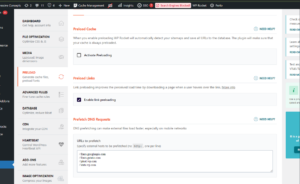
5. In WP Rocket, disable Preload Cache > Activate Preloading
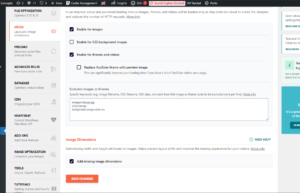
6. In WP Rocket, disable LazyLoad for CSS Background Images .
7. The following options should be thoroughly tested in an incognito browser for each site.
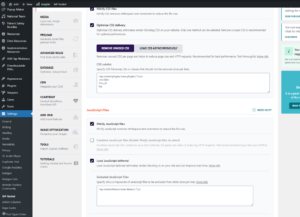
File Optimization > Optimize CSS Delivery (click the button)
These may also be checked but must be thoroughly tested incognito.

Media settings:
Preload settings:
Find the URLs to preload by looking at the Waterfall in GTMetrix
You should see this message at the top of the website:

When running a GT Metrix test:
- In Pressable. Clear the Object Cache and Edge Cache for the website.
- In WordPress admin, clear WP Rocket cache and WP Rocket Used CSS from dashboard admin bar.
- Make sure you at are the dashboard not on a page or on the live website.
- Run the GTmetrix test 3 times. If you do it only once you will get a bad score, since Batcache hasn’t been triggered yet.
8. If having issues with the TTFB you need to confirm Batcache is working.
Log out of everything. Go into the site in Incognito mode and refresh several times until you see and confirm this shows in Dev Tools > Network > (refresh the page) > click the domain [document Type] > Headers > Response Headers > X-Nananana > Batcache-Hit.
If it doesn’t ever show you have a plugin conflict that is causing Pressable’s Batcache to not work. You will need to troubleshoot this on a staging copy of the site, disabling plugins and testing, then advise the project manager of any actions we can take (remove plugin, replace, or contact developers).
Examples
Example acertusdelivers.com
- With all broken settings and CDN enabled
- https://gtmetrix.com/reports/acertusdelivers.com/kNR0sIJM/
- C
- With all the above adjustments
- https://gtmetrix.com/reports/acertusdelivers.com/BShYxvQk/
- A
- https://pagespeed.web.dev/analysis/https-acertusdelivers-com/22pilv7s7u?form_factor=desktop
—
Example juliusblum.com
- With all broken settings and CDN enabled
- https://gtmetrix.com/reports/www.juliusblum.com/B6JPL6l2/
- C
- with all the above adjustments
- https://gtmetrix.com/reports/www.juliusblum.com/VLs96nrF/
- A
- https://pagespeed.web.dev/analysis/https-juliusblum-com/fx2bw7qi84?form_factor=desktop
—
Example saferbirth.com
- With all broken settings and CDN enabled
- https://gtmetrix.com/reports/saferbirth.org/jcHlXrHL/
- F
- with all the above adjustments
- https://gtmetrix.com/reports/saferbirth.org/Tuaa1Zhn/
- A
—
Example wigsforkids.org
- With all broken settings and CDN enabled
- https://gtmetrix.com/reports/wigsforkids.org/hhAoFiGZ/
- F
- with all the above adjustments
- https://gtmetrix.com/reports/wigsforkids.org/liHnoxx2/
- B
—
Example lssi.org
- With all broken settings and CDN enabled
- https://gtmetrix.com/reports/www.lssi.org/G8oqeVmr/
- D
- with all the above adjustments
- https://gtmetrix.com/reports/lssi.org/yFvF4QKS/
- A
- https://pagespeed.web.dev/analysis/https-lssi-org/7sknwoeoau?form_factor=desktop
—
Example passiveinvesting.com
- With all broken settings and CDN enabled
- https://gtmetrix.com/reports/www.passiveinvesting.com/piFvJHYE/
- C
- with all the above adjustments
- https://gtmetrix.com/reports/www.passiveinvesting.com/SJlp6Wkr/
- A
—
Example smg.com
- With all broken settings and CDN enabled
- https://gtmetrix.com/reports/smg.com/8yG6NmnR/
- E
- with all the above adjustments
- https://gtmetrix.com/reports/smg.com/CIf2ABL7/
- A
—
Example newporthealthcare.com
- With all broken settings and CDN enabled
- https://gtmetrix.com/reports/newporthealthcare.com/IExZfzzg/
- F
- with all the above adjustments
- https://gtmetrix.com/reports/newporthealthcare.com/DVFaBWhb/
- B